Diagnostic Scales
How to Use
The following information will help you take observations using the Diagnostic Scales.
How to Install the My Inhealhcare App
- Open the App Store or Google Play Store on your mobile/tablet.
- In the search bar, enter My Inhealthcare.
- Click on the My Inhealthcare app and click Install.
- The app will take a few moments to download onto your mobile/tablet.
- Open the app and enter your Username and Password.
- When you first log into the app, you will be prompted to create a 6-digit PIN code.
- This PIN code will be used for future log ins.
- Once logged in, the app will display your name and the present day observation task.
- Please ensure you remain logged into the app while taking your observation.
- If you close the app or log out before submitting, your reading remains on the app.

Taking Your Observations
Step 1 - Log In and Power On
- Log into the app and place the scale on a flat, hard surface (avoid soft or uneven flooring).
- Step onto the scale with your feet parallel and your weight evenly distributed.
Step 2 - Take Your Observation
- Weigh yourself with dry, bare feet, ensuring they are correctly positioned on the electrodes.
- Additionally, to ensure accurate readings, refrain from touching your legs while on the scale.
- Please stand still while the scale measures your weight.
Step 3 - Read and Record
Weight
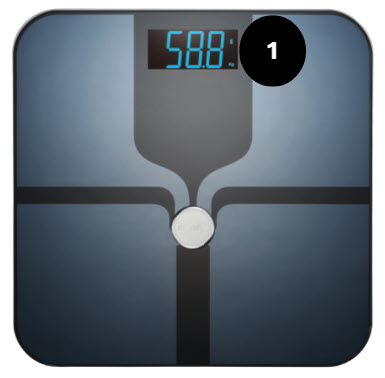
The weight reading will appear on the scale monitor. For example, 58.8
- Your weight will appear on the scale monitor (number 1).
- Click Connect to Microlife Scale.
- The observation will appear in the app.
- To take another observation, press Clear and repeat the steps.
Entering Your Observation Manually
This applies to those who are not using the Bluetooth option, that connects the observation to the app automatically using the Connect button.
- Enter the weight observation shown on the scale monitor (number 1) into the app.
Step 4 - Submit Observation
- Complete any remaining observations/questions.
- Click Submit to send these to the clinical team.
Diagnostic Scale Cleaning Instructions
- Please refer to the device booklet in your kit bag for detailed cleaning instructions.